Knit The Chart

Knit The Chart

Iedere toer telt

Volg, ontwerp en brei je patronen. Toer voor toer, met Ravelry in de app.

Every row counts

Follow, design and knit your patterns. Row by row, with Ravelry in the app.

Gratis te proberen · nieuw in versie 2.0: de patroonvolger, Mijn maat en Ravelry

Free to try · new in version 2.0: the pattern follower, My size and Ravelry

Zo brei je met Knit The Chart

This is how you knit with Knit The Chart

De breimodus

Brei je telpatroon toer voor toer

Eén tik en je bent bij de volgende toer. De app laat zien hoeveel steken je per kleur breit, en onthoudt waar je gebleven bent.

Knitting mode

Knit your chart row by row

One tap takes you to the next row. The app shows how many stitches you knit in each colour, and remembers where you left off.

Ravelry, de pdf-lezer en Mijn maat

Je patroon, in jouw maat

Zoek patronen op Ravelry en open ze meteen in de pdf-lezer. Kies je maat, en de app markeert jouw getallen in het hele patroon.

Ravelry, the PDF reader and My size

Your pattern, in your size

Search for patterns on Ravelry and open them straight in the PDF reader. Choose your size, and the app highlights your numbers throughout the pattern.

De creator

Ontwerp je eigen telpatroon

Teken je eigen telpatroon, voeg motieven uit Mijn telpatronen toe met een tik, en zie hoe je patroon doorloopt voordat je opzet.

The creator

Design your own chart

Draw your own chart, add motifs from My charts with one tap, and see how your pattern repeats before you cast on.
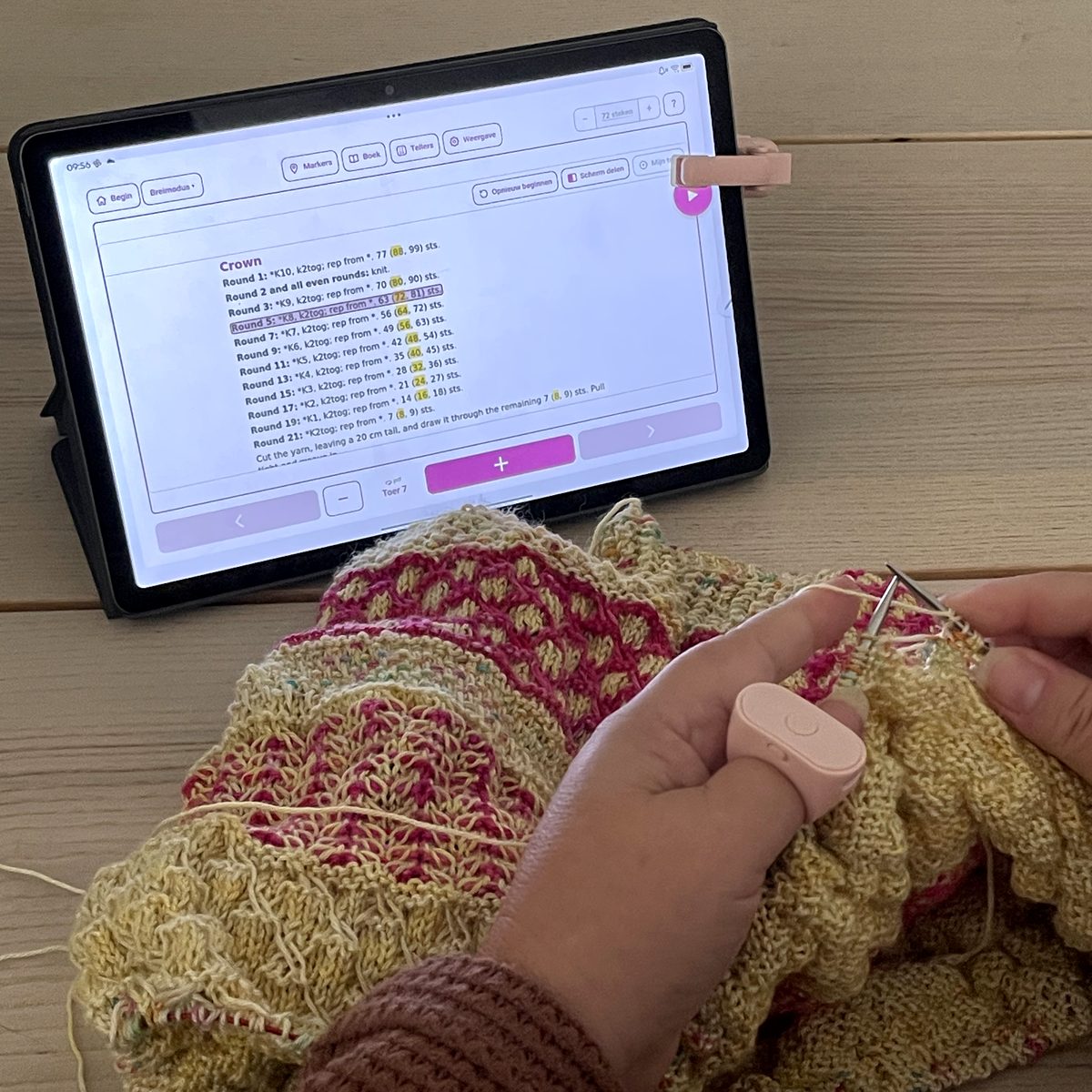
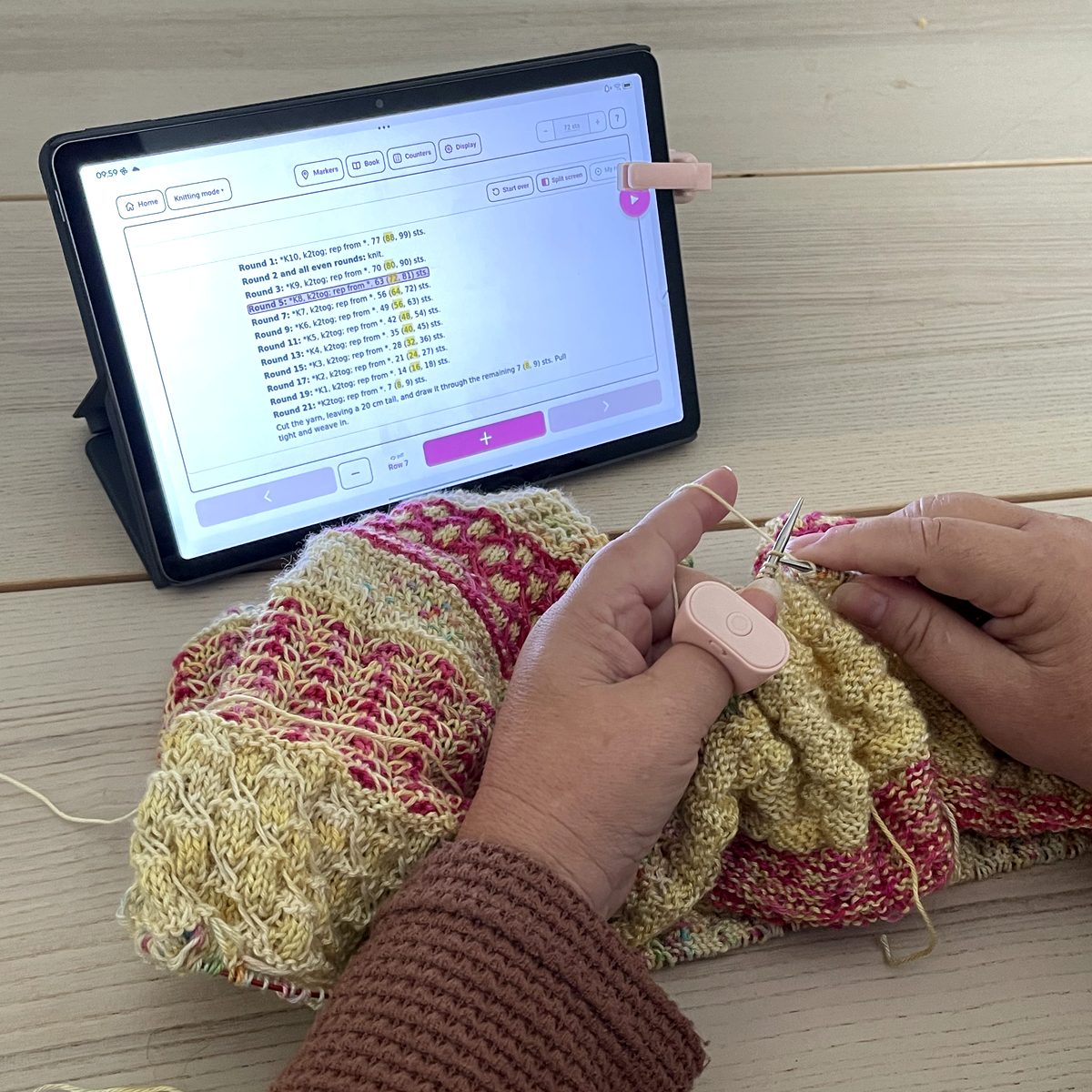
Breiende handen met een ring om de duim, en een tablet met Knit The Chart in de breimodus, met een afstandsbediening voor e-readers op de doorbreiknop Knitting hands with a ring on the thumb, and a tablet with Knit The Chart in knitting mode, with an e-reader remote clipped over the keep-knitting button

De doorbreiknop

Brei door zonder je naalden los te laten

Klem een afstandsbediening voor e-readers aan je scherm, boven de doorbreiknop. Eén druk op de ring om je vinger, en je patroon gaat een stap verder.

De knop weet zelf wat je volgende stap is: eerst langs je toer, dan een toer hoger. Heb je een patroon en een telpatroon in de breimodus, dan wisselt hij er zelf tussen. Ook zonder ring, met een tik op je scherm.

The keep-knitting button

Keep knitting without putting down your needles

Clip an e-reader remote to your screen, over the keep-knitting button. One press on the ring on your finger, and your pattern moves on a step.

The button knows your next step: first along your row, then up a row. With a pattern and a chart in knitting mode, it switches between them by itself. Without a ring too, with a tap on your screen.

Je raakt de tel niet kwijt

Knit The Chart houdt je bij de les. In je telpatroon, in je patroon, en in je eigen aanpassingen.

Zet je patroon in de breistudio: een pdf, een foto of een patroon van Ravelry. De app selecteert je telpatroon en herkent de steken. Klopt er iets niet, dan stel je het zelf nauwkeurig bij. Jij houdt de regie.

Daarna brei je toer voor toer, met een grote min en plus. De toer waar je bent springt eruit, de rest dekt de app voor je af, zo ver als jij wilt. Leg je het weg, dan sta je bij het oppakken nog precies waar je gebleven was.

Brei je van een geschreven patroon? Dan volg je het met de patroonvolger, en met Mijn maat zie je jouw getallen in het hele patroon gemarkeerd.

Je hebt geen account nodig en je patronen blijven op je eigen apparaat. Alleen voor Ravelry ga je online.

Vijf onderdelen, één belofte. En verder niets: geen agenda, geen garenvoorraad, geen sociaal netwerk. KTC doet wat je nodig hebt tijdens het breien. Dat is een keuze.

You won't lose your place

Knit The Chart keeps you on track. In your chart, in your pattern, and in the changes you make yourself.

Put your pattern in the knitting studio: a PDF, a photo or a pattern from Ravelry. The app selects your chart and recognises the stitches. If something's off, you fine-tune it yourself. You stay in control.

Then you knit row by row, with a large minus and plus. The row you're on stands out, the rest is dimmed as far as you like. Put it down, pick it up, and you're still exactly where you left off.

Knitting from a written pattern? Follow it with the pattern follower, and with My size you see your numbers highlighted throughout the pattern.

You don't need an account and your patterns stay on your own device. You only go online for Ravelry.

Five parts, one promise. And nothing else: no planner, no yarn stash, no social network. KTC does what you need while you knit. That's a choice.

Waarom Knit The Chart

Why Knit The Chart

Gericht

Een teller voor telpatronen. Geen afleiding, geen ruis.

Focused

A counter for charts. No distractions, no noise.

Eenvoudig

Ook fijn als je normaal op papier werkt. Lage drempel.

Simple

Great even if you usually work on paper. Easy to start.

Altijd mee

Werkt op tablet en telefoon, met duidelijke schermen. Je breiwerk gaat overal mee.

Always with you

Works on tablet and phone, with clear screens. Take your knitting anywhere.

Vijf delen, één app

Knit The Chart bestaat uit vijf onderdelen. Je gebruikt wat je nodig hebt, wanneer je het nodig hebt.

Five parts, one app

Knit The Chart has five parts. You use whichever you need, whenever you need it.

De breistudio

Hier begin je. Elk breiproject heeft zijn eigen plek, met je patroon en je telpatronen bij elkaar. Vanuit de breistudio ga je met één tik naar de breimodus, de pdf-lezer of de creator.

The knitting studio

This is where you start. Every knitting project has its own place, with your pattern and your charts together. From the knitting studio one tap takes you to knitting mode, the PDF reader or the creator.

De breimodus

Hier brei je. Je gaat met een grote min en plus toer voor toer door je telpatroon. De toer waar je bent springt eruit, de rest dekt de app voor je af, zo ver als jij wilt. Je raakt de tel niet kwijt, ook niet als de telefoon gaat. Met de doorbreiknop en een afstandsbediening voor e-readers brei je door zonder je naalden los te laten.

Knitting mode

This is where you knit. A large minus and plus take you through the chart row by row. The row you're on stands out, the rest is dimmed as far as you like. You never lose your place, not even when the phone rings. With the keep-knitting button and an e-reader remote you keep knitting without putting down your needles.

De pdf-lezer

Je hele patroon in de app, zonder dat je hoeft te wisselen tussen apps. Maak aantekeningen direct op de pagina, leg een leesliniaal onder de regel die je leest, en zet er losse tellers bij waar je ze nodig hebt. Met de patroonvolger volg je een geschreven patroon stap voor stap, en Mijn maat markeert jouw maat in het hele patroon.

The PDF reader

Your whole pattern inside the app, no switching back and forth. Annotate right on the page, put a reading ruler under the line you're reading, and add floating counters wherever you need them. The pattern follower takes you through a written pattern step by step, and My size highlights your size throughout the pattern.

De creator

Pas je telpatroon aan of maak er zelf een. Breid hem uit, spiegel een motief, plak delen aan elkaar, verander een steek of een kleur, of zet een afbeelding om naar een telpatroon. Wat je maakt bewaar je in Mijn telpatronen en gebruik je zo weer in een nieuw breiproject.

The creator

Adjust your chart or build one from scratch. Extend it, mirror a motif, join parts together, change a stitch or a colour, or turn an image into a chart. Whatever you make is saved in My charts, ready to use in a new knitting project.

Ravelry in de app

Koppel de app aan je Ravelry-account. Zoek patronen op Ravelry, open patronen uit je Ravelry-bibliotheek meteen in de pdf-lezer, en werk je Ravelry-project bij met je voortgang en foto’s. Je gebruikt het alleen als je wilt: zonder Ravelry werkt de app net zo goed.

Ravelry in the app

Connect the app to your Ravelry account. Search for patterns on Ravelry, open patterns from your Ravelry library straight in the PDF reader, and update your Ravelry project with your progress and photos. Use it only if you want to: without Ravelry the app works just as well.

Wat de app voor je doet

What the app does for you

De patroonvolger

Volg een geschreven patroon stap voor stap, zodat je altijd ziet waar je bent.

Pattern follower

Follow a written pattern step by step, so you always see where you are.

Mijn maat

Kies je maat, en de app markeert jouw getallen in het hele patroon.

My size

Choose your size, and the app highlights your numbers throughout the pattern.

Ravelry in de app

Zoek patronen, open ze uit je Ravelry-bibliotheek en werk je Ravelry-project bij met je voortgang en foto’s.

Ravelry in the app

Search for patterns, open them from your Ravelry library and update your Ravelry project with your progress and photos.

Doorbreiknop

Brei door zonder je naalden los te laten. Met een afstandsbediening voor e-readers en een ring om je vinger gaat je patroon een stap verder.

Keep-knitting button

Keep knitting without putting down your needles. With an e-reader remote and a ring on your finger, your pattern moves on a step.

Van afbeelding naar telpatroon

Zet een afbeelding om naar een telpatroon, met een afmeting en een aantal kleuren dat je zelf kiest.

From image to chart

Turn an image into a chart, with a size and a number of colours you choose yourself.

Het voorbeeld van je breiwerk

Zie hoe je telpatroon doorloopt en hoe vaak het in je breiwerk past, voordat je opzet.

Preview of your knitting

See how your chart repeats and how many times it fits in your knitting, before you cast on.

Donkere modus

Rustig voor je ogen als je ’s avonds breit.

Dark mode

Easy on your eyes when you knit in the evening.

Automatische steekherkenning

De app selecteert je telpatroon en herkent de steken voor je.

Automatic stitch recognition

The app selects your chart and recognises the stitches for you.

Pdf en foto

Voeg je patroon toe als PDF of als foto van een papieren telpatroon.

PDF and photo

Add your pattern as a PDF or a photo of a paper chart.

Pdf-lezer met aantekeningen

Lees je hele patroon in de app en maak aantekeningen direct op de pagina.

PDF reader with notes

Read your whole pattern in the app and annotate right on the page.

Toer voor toer tellen

Een grote − en + knop. De app markeert je actieve toer, ook in brede telpatronen.

Count row by row

A large − and + button. The app highlights your active row, even in wide charts.

Herhalingen

Geef een herhaal-gebied op. De app telt de herhalingen voor je.

Repeats

Set a repeat section. The app counts the repeats for you.

Losse toerentellers

Extra tellers die met je telpatroon meelopen of los blijven staan.

Floating counters

Extra counters that run along with your chart or stand on their own.

Herinneringen

Zet een herinnering in een teller, zodat je niets vergeet.

Reminders

Set a reminder in a counter, so you don't forget a thing.

Markeringen en kleuren

Zet eigen markeringen en kleuren op de plekken die je wilt onthouden.

Markers and colours

Place your own markers and colours on the spots you want to remember.

Recht zetten

Een scheve foto? Draai hem recht tot op 0,1 graad nauwkeurig.

Straighten

A crooked photo? Rotate it straight, accurate to 0.1 degrees.

Notities

Schrijf per breiproject losse aantekeningen. Alles bij elkaar.

Notes

Write notes per project. Everything in one place.

Gratis beginnen, daarna kies je zelf

Start for free, then you choose

Gratis

€ 0

Brei één eigen breiproject, met de breimodus, de pdf-lezer en Ravelry. Het voorbeeldproject, een sok, staat er al klaar.

Free

€0

Knit one project of your own, with knitting mode, the PDF reader and Ravelry. The example project, a sock, is ready for you.

Jaarabonnement

€ 19,99 per jaar

De eerste 2 weken gratis. Het abonnement wordt elk jaar verlengd, tot je het opzegt in de App Store of Google Play.

Yearly subscription

€19.99 per year

The first 2 weeks are free. The subscription renews every year until you cancel it in the App Store or Google Play.

Levenslang

€ 59,99 eenmalig

Eén keer betalen, en de volledige versie is van jou. Ook bij alle updates.

Lifetime

€59.99 once

Pay once, and the full version is yours. Including all updates.

De volledige versie geeft je onbeperkt breiprojecten, de patroonvolger, Mijn maat, de creator en back-ups. Heb je de app al eerder gekocht? Dan houd je de volledige versie.

Prijzen in Nederland. In andere landen kan de prijs in de App Store of Google Play afwijken.

The full version gives you unlimited knitting projects, the pattern follower, My size, the creator and backups. Bought the app before? You keep the full version.

Prices in the Netherlands. In other countries the price in the App Store or Google Play may differ.

Alles stap voor stap

Korte filmpjes per onderdeel, van je eerste breiproject tot de patroonvolger. De uitleg in de filmpjes is in het Engels.

Everything step by step

Short videos for every part of the app, from your first knitting project to the pattern follower.

Klaar om rustiger te breien?

Knit The Chart staat nu in de App Store en Google Play. Gratis te proberen.

Ready to knit more calmly?

Knit The Chart is now on the App Store and Google Play. Free to try.

Veel breiplezier, iedere toer telt.

Happy knitting, every row counts.